Our test files and environment
We used a synthetic six-second MP4 encoded as H.264 at 640 × 360 pixels and 30 frames per second, plus a synthetic 960 × 540 PNG. Browser automation used Chromium with a 390 × 844 mobile viewport, touch emulation, and downloaded files inspected with image-decoding tools. This does not substitute for testing on a physical Android phone or iPhone.
Try the same inputs in your own browser. Download the synthetic six-second MP4 or download the synthetic 960 × 540 PNG. Both files are created for testing and contain no family media.

Results by tool
- Video Frame Extractor: downloaded a JPEG at 640 × 360, matching the decoded source dimensions. Try extractor.
- Best Photo Finder: scored twelve evenly spaced candidates, displayed eight results, and downloaded a 640 × 360 source-size frame. Try scanner.
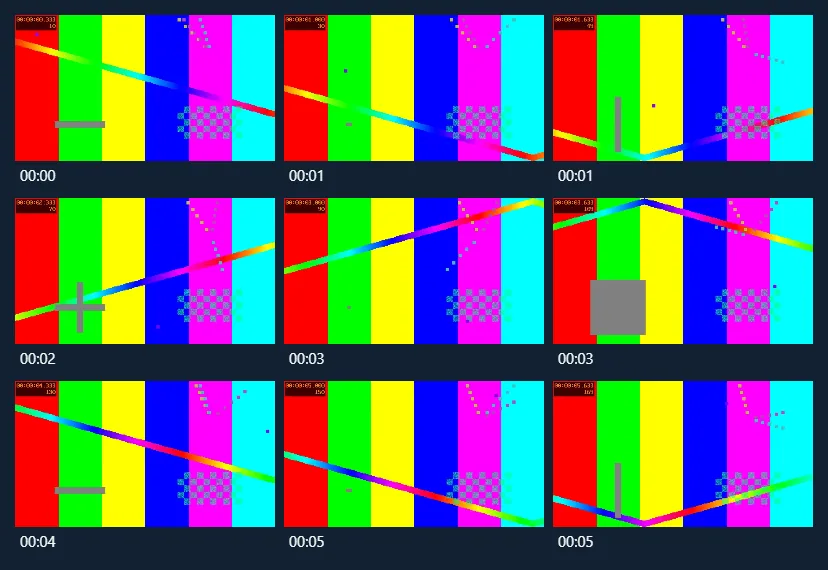
- Contact Sheet Maker: exported a PNG grid of nine sampled video frames with timestamp labels. Try contact sheets.
- Thumbnail Maker: downloaded a 1280 × 720 PNG from a 960 × 540 image. Try thumbnails.
- Image Compressor: created a valid 960 × 540 WebP from the synthetic PNG. Try compressor.
- Image Resizer: exported the input as a 1080 × 1080 PNG using Crop to fill. Try resizer.
Actual output examples

What these tests do not prove
These tests do not establish exact-frame accuracy for variable-frame-rate video, compatibility with every HEVC/AV1 video, successful 4K processing on all phones, perceptual quality of automated picks, support for HEIC export, or successful use of the site after Cloudflare deployment. Web browsers have codec, memory and canvas-size limits. A larger numeric output resolution is not proof of sharper source imagery.
Photo privacy export
We used a synthetic JPEG with known GPS and camera tags. After covering part of the image in the photo privacy tool, we opened the downloaded PNG and verified that the cover pixels were solid black, the dimensions matched, and the source EXIF and GPS tags were absent.
Privacy boundary
For this release, we loaded each editor from a local preview in Chrome 157 at a 390 × 844 viewport, then took the browser offline before selecting the test file. All seven tools generated downloadable images while offline. During these workflows the network log showed no media-transfer requests. The only permitted background requests in the test were for known static example images. These tests cover editing in a loaded page and leave offline reloads and the deployed site for separate checks.
Report an issue
If your browser cannot load a file, make a note of its file format, approximate duration, phone and browser version. Please don't share private videos. Our contact page will show a working support address before launch.